Caller ID - Block SMS & Calls
- 4.8
- Rating
- 100.00K
- Installs
- Free
- Price

 Analysis by App-foxy
When an unknown number interrupts an ordinary day, the useful question is not only who is calling, but whether the answer is worth the interruption. Caller ID - Block SMS & Calls is built for that small but frequent decision. I reviewed it as a communication app from Oxylab Studio, focusing on the way its caller identification, call blocking, and SMS organization fit into a normal phone routine rather than treating it as a feature checklist.
The app is free and aimed at Everyone, which makes its basic appeal easy to understand: it adds a layer of control around calls and text messages without asking you to replace your phone’s main communication tools. Its current version is 2.1, and it supports devices running Android 8.0 or later. That broad system requirement is helpful for people using older phones, although the experience can still vary depending on the phone maker and how aggressively the device manages background activity.
How Caller ID - Block SMS & Calls fits into everyday phone use
The first thing I noticed about this kind of app is that its value appears in short moments rather than long sessions. You are unlikely to open it for entertainment. Instead, you notice it when a call arrives from a number you do not recognize, when unwanted messages begin to crowd the inbox, or when you want to stop a repeat nuisance without manually handling every interruption.
You May Also Like

 Blood Strike: 2.5 Anniversary
Blood Strike’s Loadouts Turn Every Drop Into a Tactical Gamble
A close look at Blood Strike’s custom loadouts: how fast access to signature weapons reshapes its battle royale rhythm, rewards preparation, and narrows the gap between fights.

 Pandora - Music & Podcasts
Pandora’s Music Is Easy to Start, but Harder to Recover
Pandora’s strength is its low-effort path from a seed to a station. Its weak spot is how much confidence it asks you to place in connection, setup, and quiet recovery.

 8 Ball Pool
 Is Built on Rivalries, Rematches, and Routine
A close look at the rivalries, rematches, shared routines, and unanswered safety questions that turn a quick pool match into a persistent mobile community.

 Samsung Music
’s Quiet Strength Is Playing What You Already Own
Its reach comes less from spectacle than from dependable access to a personal library. That simplicity is both the app’s strongest retention engine and its ceiling.

 AccuWeather: Weather Radar
AccuWeather Review: A Quick, Clear Forecast for Everyday Decisions
For everyday plans, the best forecast is the one you can understand quickly. AccuWeather makes rain timing, radar, and local conditions easy to act on, with a few trade-offs.

 Hill Climb Racing
Why Hill Climb Racing Still Turns Crashes Into One More Run
A tiny car, a bumpy hill and one more upgrade: Hill Climb Racing keeps resurfacing because its simple chaos makes every near-miss feel personal.
More From Our News Desk



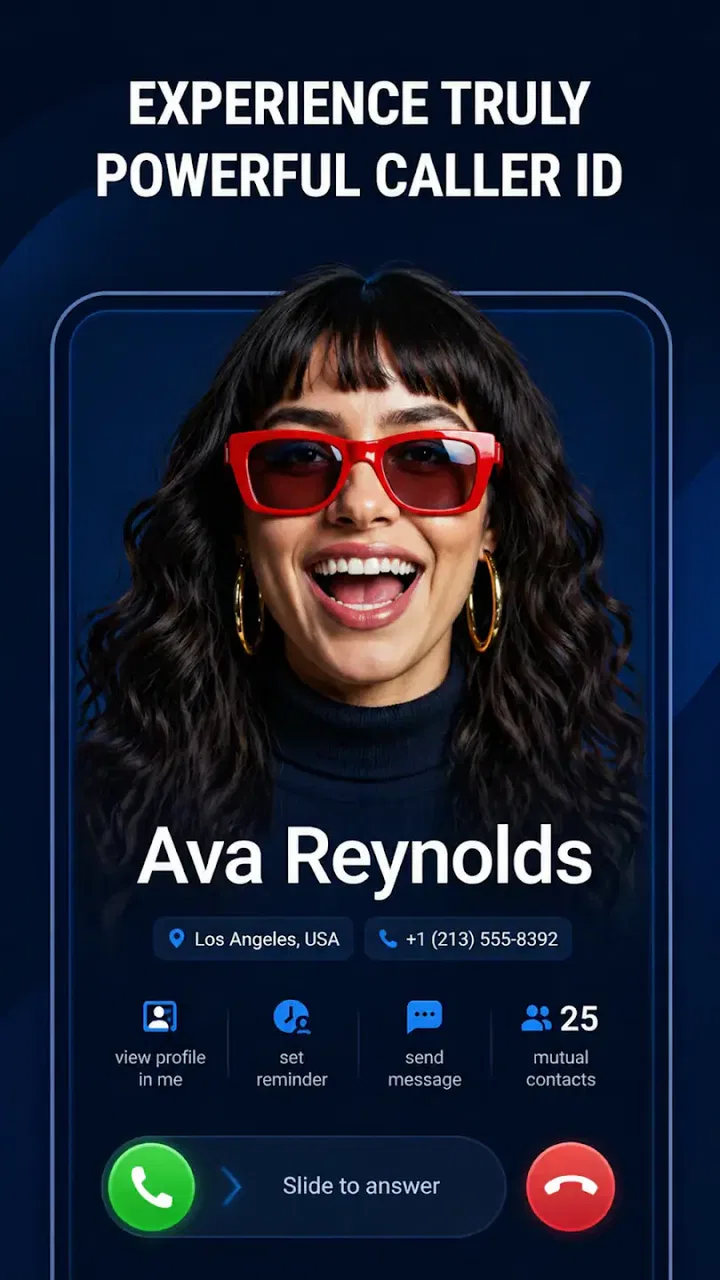
The caller identification function is the central reason to install it. A name or warning attached to an incoming number can give you enough context to decide whether to answer, wait, or let the call pass. That does not remove the need for judgment. Caller identification should be treated as guidance, not proof that every labeled call is safe or every unfamiliar number is harmful. I found that the best habit is to use the information as a quick filter and then rely on your own expectations before returning a call.
The blocking side is more useful when you think in terms of repeat problems. If the same unwanted caller keeps appearing, stopping that number can save more time than repeatedly dismissing it. The SMS organizer serves a related purpose: it helps separate useful conversations from the less important messages that make a phone feel noisy. Together, these tools turn the app into a small control panel for incoming communication.
What feels quick, and what depends on the phone
Caller ID has to be timely to be worthwhile. If information appears only after you have already answered, it loses much of its practical value. In normal use, I would judge this app by whether it keeps the interaction simple: the phone rings, the incoming number is easier to interpret, and I can make a decision without opening several menus. That is the right performance expectation for Caller ID - Block SMS & Calls.
There is an important distinction between perceived speed and raw processing power. The app is not doing the same kind of work as a game or video editor. A quick response here means that identification, blocking choices, and message organization do not make the phone feel delayed. Because phone manufacturers handle calls and background activity differently, a smooth experience on one device may feel less immediate on another. Battery-saving settings, notification behavior, and the age of the phone can all influence what you see.
I also prefer this type of utility when it stays out of the way. A caller protection tool should not make me wait through a long startup process every time I need to check a number. The practical advantage is strongest when the app is used as a quiet filter rather than a destination that demands constant attention.
Heavy-use moments reveal the real trade-offs
The busiest situations are not necessarily technical stress tests. They are days when several unknown calls arrive, messages accumulate, and you need to make repeated decisions quickly. This could happen while arranging deliveries, dealing with service providers, or waiting for a call from a workplace that is not yet saved in your contacts. In those moments, caller identification can reduce hesitation, while blocking helps prevent the same unwanted source from taking over the day.
A second realistic scenario is a family phone shared by people with different habits. One person may want to answer almost every call, while another prefers a quieter inbox. An organizer can make the message list easier to review, but it does not replace a conversation about which contacts should remain reachable. I would set up blocking carefully in that situation, especially if the phone is used for school, medical, delivery, or work communication.
There is also a useful workflow for people who receive many text messages but do not want to delete everything. Instead of treating the inbox as a permanent archive, I would use the organizer to review incoming messages in batches: deal with anything requiring a reply, retain conversations that matter, and move attention away from low-value interruptions. This is a more sustainable habit than checking every message the instant it arrives.
One non-obvious trade-off is that more filtering can create more responsibility. A blocked call may be genuinely unwanted, but an unfamiliar number can also belong to a legitimate person using a new line. I would avoid aggressive blocking when expecting an important call. The safest approach is to begin with obvious repeat nuisances and expand only after seeing how the app fits your routine.
Stability matters more than extra decoration
For a communication utility, reliability means more than not crashing. The app needs to remain understandable when you are handling an incoming call, reviewing a message, or changing a blocking decision. I value a tool like this when its controls are predictable and when I can recover from a mistaken choice without having to rebuild my entire contact routine.
Recovery is especially important with blocking. Before using any broad filtering approach, I would check the blocked-number area and make sure I understand how to reverse a decision. That simple preparation prevents the most frustrating outcome: missing a legitimate call and then not knowing where to look. A good personal rule is to review blocked entries occasionally, particularly after a period when you were expecting calls from new contacts.
The same caution applies to SMS organization. Sorting messages can make an inbox calmer, but organization should not become an excuse to ignore important conversations. I would still scan the relevant sections regularly, especially if the phone receives authentication messages, appointment reminders, delivery updates, or work-related texts. The app can reduce clutter; it cannot decide the importance of every message with perfect accuracy.
Its public reception is encouraging, with a 4.8 average from around 717 ratings and more than 100K installs. Those figures suggest that many people find the basic idea useful, but they do not guarantee identical performance on every Android phone. Communication apps interact with system-level behavior, so the most meaningful test is whether it behaves consistently on your particular device over several days.
Older phones and Android compatibility
Support beginning with Android 8.0 makes the app accessible to users who are not carrying a recent handset. That is a practical advantage for anyone keeping an older phone as a primary device, backup, or family phone. At the same time, an older operating system may come with different notification controls and background restrictions than a newer one, so I would pay attention to whether caller information and message handling appear when expected.
Resource demands are difficult to judge from the app’s purpose alone, and I would not choose it on the assumption that every device will use battery or memory in exactly the same way. A phone with limited free storage, a crowded notification system, or strict background limits may require more maintenance than a newer model. If the app feels slow or stops behaving as expected, the first practical checks are the phone’s battery settings, notification permissions, and available storage rather than immediately blaming the app.
There is another device constraint worth considering: the phone’s built-in dialer and messaging tools may already include some caller screening or blocking controls. On a newer phone with strong native options, adding a separate app can mean learning a second interface. On an older or simpler setup, Caller ID - Block SMS & Calls may feel more valuable because it brings several related controls together. The better choice depends on whether you want consolidation or prefer to keep everything inside the system apps you already know.
Where it is stronger than ordinary alternatives
The usual alternative is to manage calls and texts one by one through the default phone and messaging apps. That approach is perfectly adequate for someone who receives very few unwanted contacts. It also has the advantage of being familiar and tightly integrated with the device. If your main need is blocking a single number once in a while, installing a dedicated tool may add more setup than benefit.
Caller ID - Block SMS & Calls becomes more attractive when the problem is repeated friction across both calls and messages. Rather than treating an unwanted call and a cluttered SMS inbox as unrelated chores, it brings them into one communication-focused experience. That combination is the app’s most convincing reason to exist. I would recommend it more readily to people who regularly screen unknown calls and want a clearer way to handle incoming texts.
It is also a better fit for users who want a focused utility instead of a broad social or contact-management platform. The app’s purpose is narrow, which can be a strength: there are fewer reasons to open it, but each reason is connected to a real phone problem. People who want extensive contact automation, advanced business call routing, or a complete replacement for their dialer may prefer a more specialized solution.
Situations where I would skip it
I would skip this app if your phone already handles caller screening and message organization exactly the way you want. Duplicate controls can make it harder to remember which app is responsible for a blocked number or a filtered message. Keeping one clear system is often better than collecting several tools that overlap.
I would also hesitate if you rarely receive unknown calls and your SMS inbox is already manageable. In that case, the free price removes the financial barrier, but not the time needed to learn and maintain another app. A utility earns its place when it removes more friction than it creates.
Finally, I would be cautious for anyone who cannot afford to miss an unfamiliar caller. Job seekers, people waiting for medical offices, and users coordinating urgent deliveries should use blocking selectively. Caller identification is helpful for prioritizing, but it should not become an automatic reason to reject every number outside the contact list.
My practical setup and performance verdict
If I were setting up Caller ID - Block SMS & Calls for a friend, I would begin with observation rather than immediately blocking broadly. I would let the caller identification feature help me recognize patterns, block only clearly unwanted repeat numbers, and review the SMS organization regularly. That workflow keeps the app useful without turning it into an invisible gatekeeper for every incoming conversation.
I would also test it during the situations that matter most: an incoming call while the phone is locked, a busy period with several messages, and a moment when a blocked decision needs to be undone. These checks reveal more than simply opening the app and browsing its interface. They show whether the tool fits the phone’s actual notification behavior and whether recovery feels straightforward.
My overall impression is that the app’s speed expectations are sensible, its usefulness grows during communication-heavy days, and its long-term value depends on careful filtering rather than maximum blocking. The Android 8.0 minimum makes it approachable for a wide range of phones, while the free model makes trying it low-risk. Still, device-specific behavior means I would judge stability over ordinary use instead of assuming identical results for everyone.
My recommendation is simple: choose it if unknown calls and disorganized texts are recurring annoyances, and use it as a measured filter rather than an aggressive wall. For people who want one focused place for caller identification, blocking, and SMS organization, Caller ID - Block SMS & Calls is a practical communication companion. If your built-in phone tools already solve those problems, or if every unfamiliar caller may be important, staying with the default apps may be the more reliable and less complicated choice.
FAQs for Caller ID - Block SMS & Calls
01What is Caller ID - Block SMS & Calls used for?
Caller ID - Block SMS & Calls is designed to help identify incoming callers and manage unwanted communication. It can show information about unknown numbers, block calls from selected contacts or suspected spam sources, and filter unwanted text messages. The exact features may vary by device, operating system, region, and the permissions you grant during setup.
02Does the app require access to my contacts, calls, or messages?
To provide caller identification and blocking features, the app may request access to call-related information, contacts, notifications, or SMS messages. These permissions are important for functions such as recognizing callers, applying blocking rules, and separating unwanted texts. Before accepting, review the permission explanations and the app’s privacy policy so you understand how your information may be handled.
03Can Caller ID - Block SMS & Calls block every spam call automatically?
The app can help reduce unwanted calls by using blocking lists, user-created rules, and available spam-identification data, but no caller ID service can guarantee that every spam or scam call will be detected. Fraudsters frequently change numbers or use spoofed caller IDs. For the best results, check blocked-call settings regularly and avoid answering or returning calls that appear suspicious.
04Will call and SMS blocking work on every Android or iPhone?
Compatibility depends on your device model, operating system version, default phone and messaging applications, and local platform restrictions. Some features may work differently on Android and iOS, while certain SMS-filtering or caller-identification tools may require the app to be selected as a default service. Check the store listing and in-app requirements before downloading to confirm supported features.
05Is Caller ID - Block SMS & Calls free to download and use?
The application may be available as a free download, but some functions can be limited by advertisements, subscriptions, in-app purchases, or usage restrictions. Premium options may include expanded caller identification, advanced blocking controls, or an ad-free experience. Review the current Google Play or App Store listing carefully, including trial terms and renewal details, before activating any paid plan.
Pros
- Identifies many unknown callers before you answer.
- Blocks unwanted calls and spam messages automatically.
- Searches numbers quickly from the app interface.
- Lets you create personal blocklists for extra control.
- Simple layout makes core features easy to find.
Cons
- Caller information may be incomplete for private or new numbers.
- Some features may require a premium subscription.
- Blocking accuracy can vary by country and region.
- The app may need access to calls and messages to work fully.
- Background protection can increase battery and data usage.

Caller ID - Block SMS & Calls
Gallery